Site layout & Menus
Site layout
By default, Lupus Decoupled Drupal only serves the main page content as part of its page API response. That way, the overall site layout may be custom-built in the frontend, while some dynamic elements like navigation menus are fetched from Drupal using separate API requests.
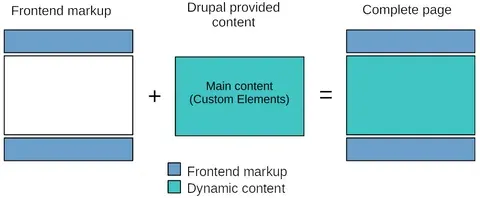
Thanks to client-side navigation, the header and footer does not need to be re-fetched for subsequent pages.
That means, by default, the Drupal "Block layout" configuration is ignored and not applied. By installing the "Lupus Decoupled Drupal - Blocks" submodule, support for that configuration may be enabled. Please refer to Advanced Topics > Block layout for more details on that.
Finally, it's possible to swap the used site-layout for some pages, e.g. by changing the value of the "layout" attribute for the page API responses. Please refer to Nuxt > Page Layouts for more details on that.
Navigation menus
Lupus Decoupled Drupal integrates with the Rest menu items module. That module is automatically installed and configured as part of Lupus Decoupled Drupal, so the REST API endpoints providing the Drupal menu items (see /admin/structure/menu) are available under https://yourdrupalsite.com/ce-api/api/menu_items/{menu_name}.
Combined with the default menu components provided by the Nuxt Drupal CE Connector modules, the main menu works out of the box, while additional menus may be fetched and displayed the same way.
Pages & Routing
By default, the frontend forwards all page requests to Drupal. Given that, Drupal's routes, URL aliases as well as 404 or 403 pages all work out of the box. However, the frontend may add custom routes in front of Drupal's routing, see "Custom routes in the frontend".
Authentication
Since page requests are processed by Drupal as usual, Drupal's authentication and session handling stays fully working. Thus, when requests provide an authentication cookie, authentication just works. By default, cookie-based authentication with a separate frontend cookie is used.